Create a Windows bootable USB drive on a Mac
A Windows image cannot simply be written to a drive the way a Linux image can. Here is why, and what to do.
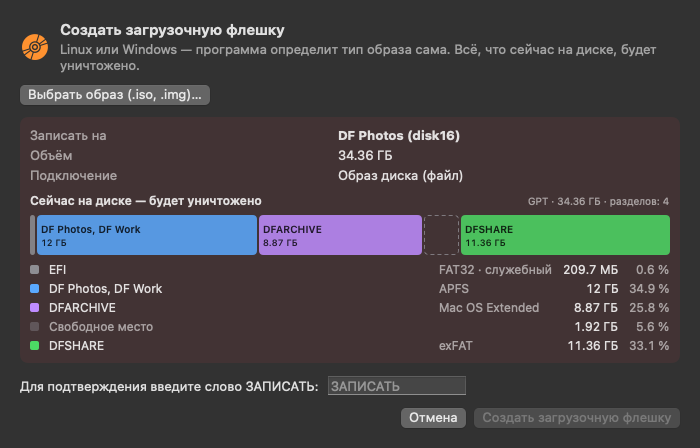
Writing an image destroys everything on the drive. Check the disk’s name and size.
Why it is not that simple
- Writing a Windows ISO byte for byte does not produce a bootable drive, whereas Linux images usually do.
- FAT32 is what UEFI boot reliably supports, but FAT32 does not accept files of 4 GB or more, and install.wim in Windows images is often larger.
- macOS cannot write to NTFS, so Microsoft’s “FAT32 + NTFS” scheme is not available on a Mac.
What Disk Fusion does
“Create Bootable Drive” (Pro): you choose an .iso image, the app detects its type itself and partitions the drive with the MBR scheme.
- If every file in the image is under 4 GB — a single FAT32 partition, “WINSETUP”, with all the files. This is the most compatible option.
- Otherwise — two partitions: FAT32 “WINBOOT” with the boot part (everything except the sources folder, plus sources/boot.wim) and exFAT “WINSETUP” on the rest of the space with the complete set of files.
- If the boot part contains a file larger than 4 GB, the app refuses: such an image cannot be written with this method.
To write, you type the word WRITE.
Honest limitations
- The two-partition option departs from Microsoft’s scheme: there the second partition is NTFS, here it is exFAT, because macOS does not write NTFS. The app has not tested this option on real computers. If Windows Setup starts but cannot find the installation files, that is a limitation of the method on that particular PC.
- Microsoft’s official method for images over 4 GB is to split install.wim into parts with the DISM tool on Windows. Disk Fusion does not do that.
- The drive is meant for installing Windows on a PC. You download the image yourself; the app downloads nothing and does not activate Windows.
Other images
Linux (.iso, .img) is written byte for byte. A macOS installer drive is made with Apple’s own createinstallmedia tool: you need the “Install macOS” app and an administrator password.
Windows is a trademark of Microsoft Corporation, macOS of Apple Inc. Disk Fusion is not affiliated with them.